Stealth Apex

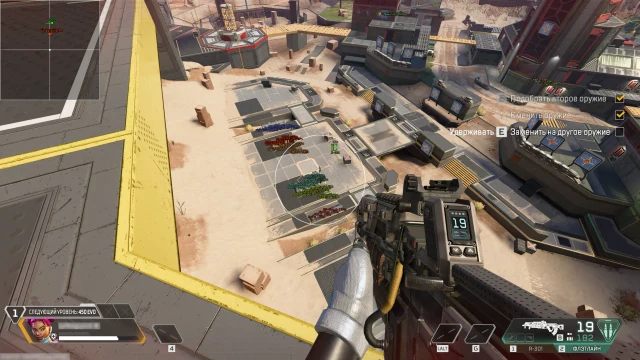
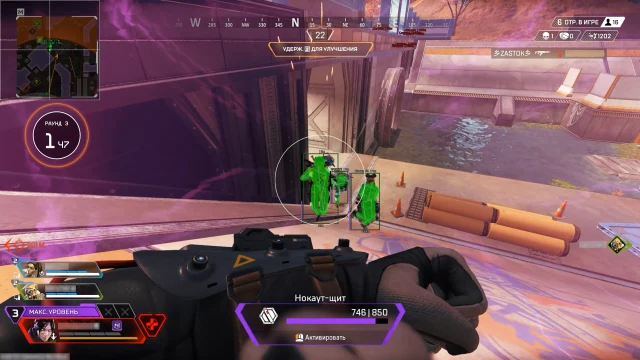
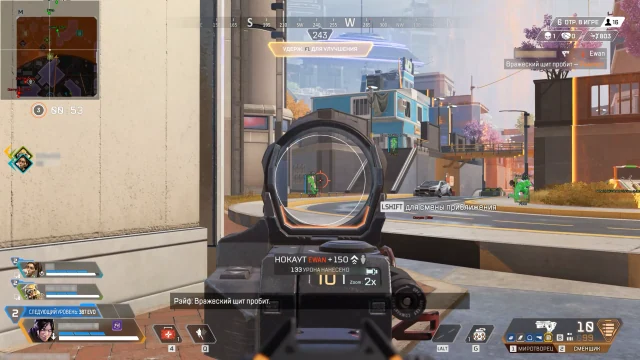
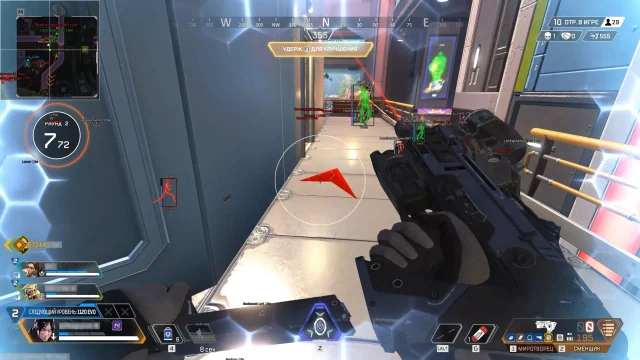
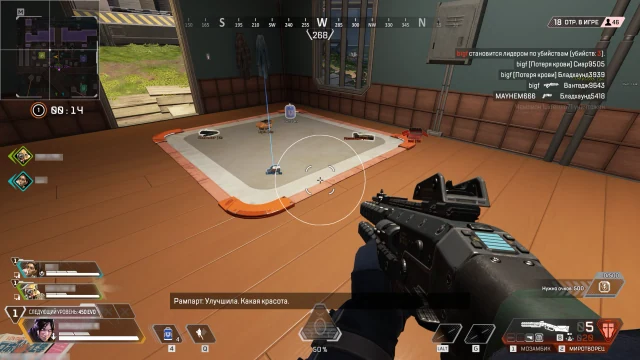
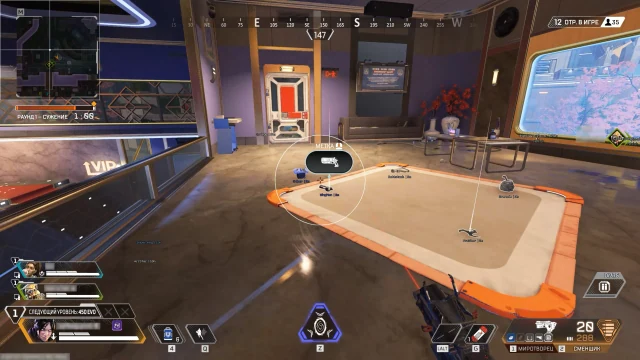
Stealth Apex combines configurable Aimbot with player, loot and corpse ESP. Adjust FOV, smoothing, bones, visibility checks, distance and artificial inaccuracy; use radar, RGB colors, hitbox transparency and a separate combat mode.
Stealth · Cheats
License plans
- 1 days — $2.85 USD · Currently unavailable
- 3 days — $6.27 USD · Currently unavailable
- 7 days — $14.25 USD · Currently unavailable
- 30 days — $28.51 USD · Currently unavailable
Product features
Aimbot
- Aimbot
- Active – Enable aimbot.
- Bind key – Hotkey for aimbot activation (e.g. RButton).
- Visible check – Works only on visible targets.
- Ignore knocked – Skips knocked / downed players.
- Aimbot Bone – Target hitbox selection (Head, Chest, Pelvis).
- Working FOV – Target acquisition angle (FOV radius).
- Aimbot speed – Aim movement speed (1–10).
- Aimbot inaccuracy – Adds artificial spread for legit behavior.
- Working distance – Maximum aimbot distance (0-600).
- Draw FOV – Draws FOV circle on screen.
- Draw target – Highlights current target.
- Draw crosshair – Draws static crosshair.
Visuals
- Visuals & Loot
- Players
- Box – Draws 2D box around player.
- Name – Displays player nickname.
- Health – Shows HP value / bar.
- Weapon – Displays current weapon.
- Skeleton – Draws player bone structure.
- Hitbox – Displays player hitbox.
- Distance – Prints distance to player.
- Distance Limit – Maximum ESP render distance (0–1000m).
- Loot
- Weapons – Highlights dropped weapons.
- Ammo – Shows ammunition.
- Heal – Highlights medical items.
- Equipment – Displays armor and clothing.
- Grenades – Shows explosive items.
- Attachment – Highlights weapon attachments.
- Minimum LVL – Filters loot by minimum rarity level.
- Distance – Shows distance to item.
- Distance Limit – Loot ESP render radius (0–1000m).
- Corpses
- Corpse – Highlights player corpses.
- Distance – Shows distance to corpse.
- Distance Limit – Corpse ESP radius (0–1000m).
Radar
- Radar
- Active – Enable radar.
- Show players – Displays players on radar.
- Player names – Shows player nicknames.
- Player direction – Displays view direction.
- Player Distance – Shows distance to player.
- Show loot – Displays loot on radar.
- Loot name – Shows item name.
- Loot distance – Prints distance to loot.
- Loot minimum LVL – Filters loot by rarity.
- Size – Radar window size (50–200 px).
- Draw distance – Radar working radius (50–400m).
Other
- Colors
- Box visible – Color of visible player box (RGB).
- Box invisible – Color of hidden player box.
- Box knocked – Color of knocked player box.
- Skeleton – Player skeleton color.
- Corpse – Corpse highlight color.
- Aimbot visuals – Color of FOV, crosshair and target marker.
- Hitbox alpha – Hitbox transparency level (0–255).
- Settings
- Language – Interface language (English / Russian).
- Menu key – Hotkey to open menu.
- Unload key – Key to fully unload cheat.
- Battle mode – Separate combat configuration mode.
- Battle mode key – Hotkey to enable battle mode.
System requirements
- Processor
- Intel / AMD; AVX instruction support required
- Operating system
- Windows 10 / Windows 11
- Disk format
- GPT
- BIOS
- UEFI
Product screenshots
About Stealth Apex
Does Stealth Apex guarantee protection against bans?
No ban-free guarantee is established by this listing. The original seller says its products are tested and publishes a status; the imported Stealth Apex status is Undetected. That status is a source snapshot, not a guarantee of future results.
Can Stealth Apex be used on a laptop?
The source FAQ mentions desktop and laptop use. For Stealth Apex, compare the exact configuration against the product-specific requirements: Intel / AMD; AVX instruction support required; Windows 10 / Windows 11; GPT; UEFI. The generic FAQ does not confirm every laptop model.
Which payment methods will be available for Stealth Apex?
VEIL payment methods and fees for Stealth Apex are pending integration. The original seller lists regional payments and cryptocurrency, including CryptoBot; these options have not been established as VEIL checkout methods.
How will Stealth Apex access be delivered?
VEIL fulfilment and delivery timing for Stealth Apex are pending integration. The original seller describes automatic key delivery and a "My keys" area; VEIL does not yet provide that fulfilment service.
Where can Stealth Apex support details be found?
VEIL support channels and response times for Stealth Apex are pending integration. The original seller points customers to its Telegram and Discord support; those channels are not VEIL support services.
Choosing Stealth Apex
Stealth Apex combines aiming with player, loot and corpse displays, radar and combat mode. Compare the information categories and configuration controls in its feature groups to decide whether this package meets your needs. Review the current status and stated system requirements before choosing one of the available license periods.